How to set certain applications to default on windows
- Press the windows key on your keyboard
- Type in "Default apps" and a result under the same name should appear, press enter
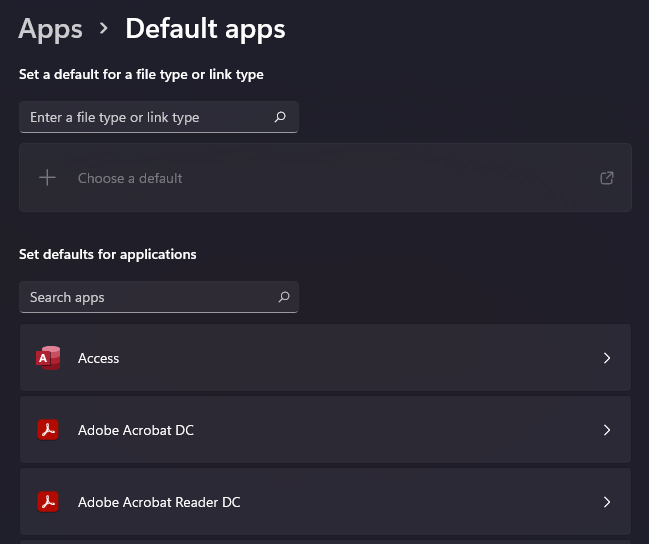
- You'll be taken to a screen that looks just like this
- From here, scroll to search, or type in the application you want to set as default
- As an example we'll click on "Adobe Acrobat DC"

- You'll get brought to a screen with many different file extensions, simply find the one you want to change and click on it
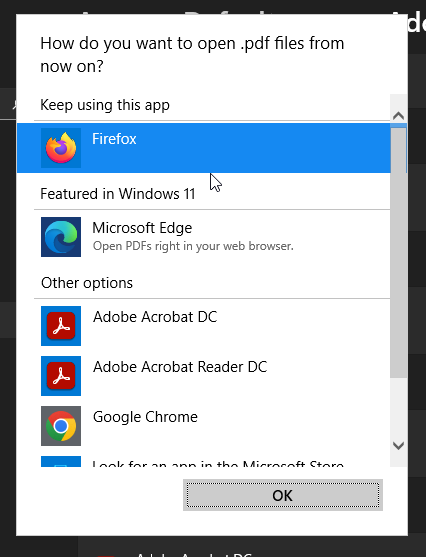
- From here you can select Adobe Acrobat DC
- The box will close and now Adobe Acrobat DC will be the default for opening PDFs
Related Articles
How to adjust your multi-monitor setup inside Windows
Navigate to your desktop Right click and on the drop down select "Display Settings" From here it will pull up a page showing the monitors and settings for them The box showing 1, would be your laptop or desktop screen. Any others will be your ...
How to restart your computer
This is a great and easy fix but, please keep in mind if you have ongoing files or projects that you are not 1000% sure are saved, make sure one last time before restarting. Click on the windows symbol, it should look something like this: You'll be ...
Onedrive Sync Issues
Click on the blue Onedrive icon on your taskbar. In the prompt that opens, click on the cog wheel in the top right corner. Then click on "Quit Onedrive". Wait about 10 or so seconds for Onedrive to fully close. At this point it will no longer appear ...
Record A New Sound On Your Computer
if you press the windows key, and type "Sound Recorder" you should get an icon that looks like this: Then this window will pop up, you can start a recording by clicking the big red circle in the center bottom. It might prompt you for access to your ...
Compilation of efficiency tips/tools
As we get closer to 4th quarter, I figured it might be helpful to give you all some tips/tricks/tools on how to make your work life a bit easier. Some of these might take some more trial and error and learning than others, but they can help ...